When Strings go wrong
- 6 minutes read - 1213 wordsEncoding for Web apps internationalisation
Some theory about Information Content & Entropy
Encoding is the process of converting data from one form into another using an unambiguous mapping. It can refer to transforming human-readable characters into a machine-readable format. The main question it raises is: how many bits do I need to encode ‘a’ (and the rest of the characters)?
The Information Content (Shannon information) quantifies the amount of “uncertainty” associated with a particular piece of information.
Given a discrete random variable X which can take N possible values, the associated probabilities of X taking the value xi is pi.
I(xi) = log2(1/pi) where I(xi) is expressed in bits. For instance, the information content of getting a heart from a deck of fifty two cards is:
log2(1 * (52/13)) = 2 bits
2 bits is the information received when learning that X has taken the value xi: heart.
From the information content, the Entropy can be derived to quantify the average amount of information contained in each piece of data received about the value X. It is defined as the expected value of I(x): H(X) = E(I(X))
Entropy can be quite useful to evaluate efficiency of an encoding mechanism as it provides a lower bound on the minimal amount of bits required to encode a sequence of values/data unambigiously.
ASCII and Unicode
ASCII is an independent encoding scheme, defining 128 characters - latin letters, digits and symbols. It uses 7-bit encoding but is often stored as 1 byte. With internationalisation of web applications, ASCII reached its limits pretty fast unable to encode non-latin characters: for instance cyrillic alphabet or japanese glyphs. To do so, other existing encodings can be used, each dealing with its specific set of characters. However, opting for this solution makes it very hard to translate, maintain and make the web sites fully accessible to international users.
Unicode was created for this purpose: one set to rule them all represent all the characters,
spanning the characters and symbols of every known written language. Unicode represents those
characters (called grapheme) using code points. It is used in conjunction with a set of multiple encoding solutions; that way,
applications store data in whatever way they see fit.
The same grapheme can be represented using different code points in Unicode. For instance, ã can be represented by either the code point for “latin-letter a with tilde” or the combinaison of two code points “latin-letter a” and “combining tilde”. Additionally, the same code point can be stored differently depending on the encoding used.
According to Wikipedia, UTF-8 is the most common encoding for websites since 2008 with 98.5% of surveyed websites using it as of March 2025. While Java uses UTF-16 to internally store strings, several modern programming languages have adopted UTF-8 for internal string representation - Go, Rust, etc.
Fixed and Variable length encoding
Fixed-length encoding defines a fixed number of bits to describe each symbol or character, regardless of its complexity or frequency. For instance, encoding letters from A to D requires 2 bits since 2 bits can describe the 4 possible values of our set. Encoding is usually represented using a binary tree where each path to a leaf node describes the encoding for this value.
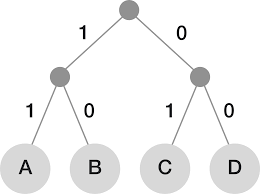
Each character have equal probability of occurring, hence all leaves of the binary tree are at equal distance from the root - the entropy is thus log2(N).
Now, let’s consider encoding integers from 0 to 9. Representing all 10 values can be achieved by using 4 bits.
The entropy of this example is E(X)=log2(10) ~ 3.3 bits. This means the fixed-length 4 bits encoding solution is inefficient. For 1000 numbers, the fixed-length encoding would require 4000 bits while the entropy suggests we’d need only 3400.
To paliate to this inefficiency, variable length encoding is used when values taken by X don’t have the same information content. If X has higher probability of taking the value xi, the encoding required is shorter. On the contrary, if taking the value xi is lower probability, we’ll need more bits to represent this value.
To sum up, variable-length encoding is optimised for compact storage of characters.
The below table provide a quick comparison reference.
| Message | UTF-8 (Variable) | UTF-32 (Fixed) |
|---|---|---|
| “Hello” | 5 bytes (1 byte/char) |
20 bytes (4 bytes/char) |
| “Café” | 5 bytes (1 byte for C, a, f, 2 bytes for é) |
16 bytes (4 bytes/char) |
| “你好” (Chinese) | 6 bytes (3 bytes/char) |
8 bytes (4 bytes/char) |
//Demo - 4 bytes needed to represent an emoji

String emojiSmile = "😊";

byte[] bytesArr = emojiSmile.getBytes(StandardCharsets.UTF_8);
System.out.println(Arrays.toString(bytesArr));
[-16, -97, -104, -118]
Huffman’s algorithm
Huffman’s algorithm provides a solution to construct an optimal variable length encoding given a set of symbols and their probabilities. There are ways to optimise the encoding length; for example by considering n-length of symbols rather than 1 by 1.
For more details on this algorithm, consult the Algos tag.
The challenges with variable-length
There is an obvious efficiency trade-off with variable-length encoding: it saves space at the cost of added complexity during data manipulation. Given a stream of code points, it is not possible to arbitrarily cut it and get the expected sequence of graphemes. In a similar fashion, we can’t count the bytes to find the number of characters in an encoded string using variable-length.
- Length calculation: length() method might not reflect the actual number of characters. Using a function counting the actual number code point in Unicode is not necessarily more accurate either.
String text = "🏴☠️";
System.out.println("String length: " + text.length());
System.out.println("String length (code points): " + text.codePointCount(0, text.length()));
String length: 6
String length (code points): 5
- Substring & Indexing operations: attempts to split a multi-bytes character can cause it to be corrupted, either by getting its index or as a result of a substring operation. Splitting the sequence of bytes directly is never a good idea - see cyrillic letter example.
String text = "café😊";

String corrupted = text.substring(0, 5);
System.out.println("Corrupted Substring: " + corrupted);
System.out.println("Character at index 4: " + text.charAt(4));
Corrupted Substring: café?
Character at index 4: ?
String extendedCyrillic = "Ԁ";
byte[] extendedCyrillicBytes = extendedCyrillic.getBytes(StandardCharsets.UTF_8);

byte[] byteSplit = Arrays.copyOfRange(extendedCyrillicBytes, 0, 1);

String decodedSplit = new String(byteSplit, StandardCharsets.UTF_8);
System.out.println("Decoded split letter (invalid): " + decodedSplit);
Decoded split letter (invalid): �
- String reversal: for the same reasons, reversing a string might cause problems. For example, Java handles muti-bytes characters using surrogate pairs, which prevents it from mishandling the multi-bytes block representing the character.
Take-aways
Realistically, it is quite rare we need to peek into individual code points of a string, let alone distinguish between its individual graphenes. Regular expressions might a good solution after all.
String text = "🏴☠️";
System.out.println(Arrays.toString(text.split("\\b{g}")));
[🏴☠️]
More often than not, we’d use indexOf to get the index of the character we’re looking and use substring method
to extract it.
In an interesting blog article, the author advocates avoiding char and code points, recommending the use of String instead while treating indexOf and substring indexes as “opaque” values.
In other words: handle Strings without assumptions on their internal structure or relying on specific characters representations.
The above examples show that direct manipulation of char or unicode code points can lead to surprises as they do not always correspond to user-perceived characters.
Reference
- MIT OCW
- Building Scalable Web Sites, Cal Henderson