The Poor Man's Load Balancer
- 9 minutes read - 1803 wordsDomain Name System: traffic distribution on a budget
It’s not magic
What happens when you type leane.dev in
your browser?
As a regular reader of this blog, I am allowing myself to take your everyday example.
You want to access the server hosting this blog, but how do you reach it? On the Internet, routing is done by finding the path to a given Internet Protocol - IP. Thing is: you don’t know my IP, not directly. It’s easier to remember the hostname: leane.dev. Yet, the browser manages to display the blog to you.
That’s where DNS comes into play. The domain name system provides a way to translate the domain name requested into an IP. In other words, the IP is the response to the DNS request happening under the hood when trying to visit a domain.
Let’s see the output of the nslookup command to illustrate the above example.
$ nslookup leane.dev

Server:		192.168.1.1
Address:	192.168.1.1#53

Non-authoritative answer:
Name:	leane.dev
Address: 137.220.67.174
Record Types
In reality, what DNS stores is no more than a list of mappings, which are individually called resource records. There exist several types of RR.
The above example shows an A record which maps hostname <-> IPv4.
The AAAA record serves the same purpose as the A record but maps to an IPv6 address instead.
(IPv6 being 4x bigger than IPv4, I’ll let you work out why it’s been called Ax4.)
Another commonly used record is the CNAME, stands for Canonical Name. It allows a hostname
to have multiple aliases. We can think of CNAMEs as a many-to-1 mapping,
to ease management of subdomains and/or allowing the backend infra to be changed without affecting users.
There are many other types of records to: point to mail servers, get the IP of an authoritative server, register a service record, pointer records used for reverse look-up or even text records (mentioned in the certificates renewal post under Web & DevOps tags). Below is a summary of the record types.
| Type   | Description                                                                                | Map                                |
|--------|--------------------------------------------------------------------------------------------|------------------------------------|
| A      | Hostname to IPv4 address mapping                                                           | Hostname → IP address             |
| NS     | Hostname that is the authoritative DNS for a domain name                                   | Domain name → Hostname            |
| CNAME  | Alias to canonical hostname                                                                | Hostname → Canonical name         |
| MX     | Mail server from alias to canonical hostname                                               | Hostname → Canonical name         |
| AAAA   | Hostname to IPv6 address mapping                                                           | Hostname → IPv6 address           |
| PTR    | IP address to the canonical hostname (reverse DNS lookups)                                 | IP address → Hostname             |
| TXT    | Allows the domain to store arbitrary text, often used for verification or policy           | Domain name → Text string         |
| SRV    | Specifies the location of services within the domain, like servers for a specific protocol | Service name → Target hostname    |
| Type   | Command to Query                               | Example                                                |
|--------|------------------------------------------------|--------------------------------------------------------|
| A      | nslookup relay1.main.educative.io              | (A, relay1.main.educative.io, 104.18.2.119)            |
| NS     | nslookup -type=NS educative.io                 | (NS, educative.io, dns.educative.io)                   |
| CNAME  | nslookup -type=CNAME educative.io              | (CNAME, educative.io, server1.primary.educative.io)    |
| MX     | nslookup -type=MX educative.io                 | (MX, mail.educative.io, mailserver1.backup.educative.io) |
| AAAA   | nslookup -type=AAAA relay1.main.educative.io   | (AAAA, relay1.main.educative.io, 2606:2800:220:1:248:1893:25c8:1946) |
| PTR    | nslookup 192.0.2.1                             | (PTR, 1.2.0.192.in-addr.arpa, example.com)             |
| TXT    | nslookup -type=TXT educative.io                | (TXT, educative.io, "v=spf1 include:_spf.google.com ~all") |
| SRV    | nslookup -type=SRV _sip._tcp.educative.io      | (SRV, _sip._tcp.educative.io, 10 5 5060 sipserver.educative.io) |
What about typo-squatting?
One might think CNAMEs are commonly used to protect against typo-squatting. (I thought I just had a brilliant
idea; and then I digged for more information…)
If you mistype gogle.com and still land on google.com, it is not just thanks to a CNAME record but
a combinaison of a CNAME and a redirect.
The CNAME record helps point traffic to the same IP as google.com and the redirect prevents the client from interacting with the
incorrect hostname.
$ curl -v gogle.com

*   Trying 142.250.179.228:80...
* Connected to gogle.com (142.250.179.228) port 80
> GET / HTTP/1.1
> Host: gogle.com
> User-Agent: curl/8.4.0
> Accept: */*
>
< HTTP/1.1 301 Moved Permanently
< Location: https://www.google.com/
< Cross-Origin-Resource-Policy: cross-origin
< X-Content-Type-Options: nosniff
< Server: sffe
< Content-Length: 220
< X-XSS-Protection: 0
< Date: Fri, 04 Apr 2025 09:56:31 GMT
< Expires: Fri, 04 Apr 2025 10:26:31 GMT
< Cache-Control: public, max-age=1800
< Content-Type: text/html; charset=UTF-8
< Age: 1535
<
<HTML><HEAD><meta http-equiv="content-type" content="text/html;charset=utf-8">
<TITLE>301 Moved</TITLE></HEAD><BODY>
<H1>301 Moved</H1>
The document has moved
<A HREF="https://www.google.com/">here</A>.
</BODY></HTML>
* Connection #0 to host gogle.com left intact
Note that a CNAME record only returns the underlying hostname to the browser. There
is no explicit redirect, instead the browser follows the IP address associated with the domain it resolved to.
In fact, using a CNAME only to handle typo-squatting is a bad idea for multiple reasons:
- Your users get used to interact with a host name that is not your primary one. How would they differentiate between a phishing website goggle.com trying to steal their credentials and google.com if legit traffic is served on gogle.com?
- Securing traffic from those hostnames need extra maintenance and configurations - certificates issuing, separate cookie sessions, etc.
- Your main server needs to accept incoming traffic from those alternative hostnames.
Bottom-line: redirect.
Infrastructure
Conceptually, DNS is an entire infrastructure of servers. DNS resolution can be done recursively or iteratively. As of 2025, there are approximately 370 million domain names across all top-level domains. A single server can’t possibly hold the map to each IP.
Understand the URL
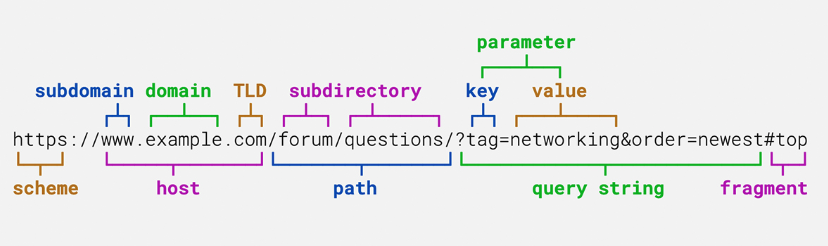
For the purpose of this post, we’ll only look at what is contained in the host part of the URL. From right to left, a hostname is defined by its: Top Level Domain, Domain name and Subdomain.
This is exactly the hierarchy of the DNS infrastructure, presenting itself as a tree-like infrastructure. Thanks to this server hierarchy, DNS is highly scalable and can handle increasing query load. One can draw a similarily with the Network Time Protol server hierarchy.
DNS Resolution
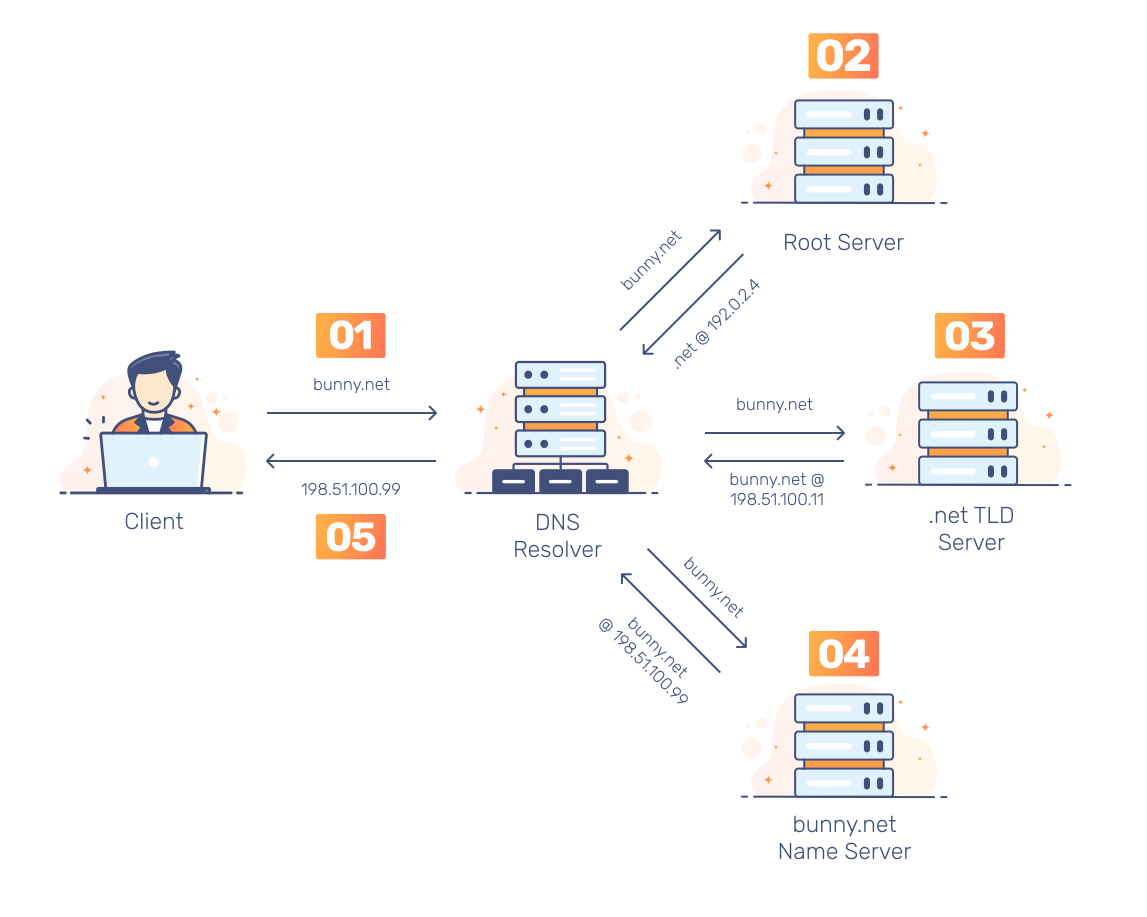
The below illustration is the iterative DNS resolution. Note that caching is commented on in the next paragraph; most requests will never query the root servers as described in step 2 because of it but we’ll look at the longest path possible for a DNS resolution for the purpose of the explanation.
-
Access hostname bunny.net from the browser,
-
DNS resolver initiates the DNS query to the root servers,
Typically, the DNS server is within the local network; most routers have a built-in DNS server which isn’t usually recursive. It forwards the request to a DNS resolver provided by the ISP.
Root servers don’t directly hold the mapping we are looking for but know which servers handle which TLD such as .com, .io, .dev, and so on. There are 13 logical Root servers - name from A to M, with over 600 instances distributed across the planet.
-
Top-level domain (TLD) name servers do not hold the map to the domain of interest but can route the DNS query to an authoritative name servers which handles this specific mapping,
-
Authoritative name servers provide the IP addresses of the requested host.
Caching
Given the operational requirement of the DNS infrastructure, most of the traffic is coming from READ operations. Hence, caching is incorporated at different layers of the DNS resolution: in the browser, in the local name server within the local network, or even the ISP’s DNS resolver.
This helps reduce latency for users and decreases network load on the DNS infrastructure.
Cached records usually expire with a time-to-live - TTL. This means consistency is eventual rather than strong in such infrastructure: an updated record will take some time reflect correctly across the internet (at most the TTL of each caching layer, since cached records would become outdated).
This can impact perceived availability to the users: the server is up and available but users will be trying to hit the cached outdated IP until the TTL expire and the record is queried again. Such update propagation relies on lazy-evaluation: the records are updated only when queried e.g. required.
The TTL value is set depending on the change-rate expected ranging from a few seconds to a few days.
This article provides great guidelines on TTL best practices.
Protocol used
Many clients rely on UDP for DNS queries. DNS protocol as defined in the RFC-1035 limits the size of the messages carried over UDP to 512 bytes. Messages exceeding this size are truncated.
In such cases, DNS may use TCP. Indeed, large-size packets are more prone to be damaged in congested networks Note there will be no deep-dive into TCP/UDP differences - see the QUIC article under the Web tag.
And Load Balancing in all that?
We want to use load balancing when multiple requests coming to the same IP are serviced with multiple machines.
The easiest way to achieve this is to create multiple A records in DNS for the application’s domain.
DNS sends back those records shuffled to the client which picks the first one.
You could also do the same thing with your MX records.
The below command performs a DNS look-up, but bypasses the local network DNS by requesting it form the server 8.8.8.8 -
the famous primary Google DNS server.
$ nslookup google.com 8.8.8.8
Performing this look-up multiple times yields different IPs: 172.217.16.238, 142.250.178.14 or even 142.250.200.14.
So why is it not ideal in its raw form? As discussed earlier, adding or removing IPs from the pool is slow; for a record update to reflect everywhere, we need to wait for the clients to look-up again the value (or re-cache it). Because the servers health isn’t monitored, DNS may be directing traffic to a dead server without knowing it.
Additionally, this standard DNS-level load balancing has no awareness real-time load and can’t dynamically adjust the traffic routing.
There are products on the market today addressing those limitations, offering DNS load balancing that incorporates back-end health checks, load-based distribution as well as geographic distribution of the traffic thanks to custom LB algorithms - beyond the classic Round-Robin. Amongst others, we can cite: CloudFlare & F5 LB or even AWS Route 53.
Quick look at dig cmd
$ dig leane.dev

; <<>> DiG 9.16.1-Ubuntu <<>> leane.dev
;; global options: +cmd
;; Got answer:
;; ->>HEADER<<- opcode: QUERY, status: NOERROR, id: 52962
;; flags: qr rd ra; QUERY: 1, ANSWER: 1, AUTHORITY: 0, ADDITIONAL: 1

;; OPT PSEUDOSECTION:
; EDNS: version: 0, flags:; udp: 512
;; QUESTION SECTION:
;leane.dev.                     IN      A

;; ANSWER SECTION:
leane.dev.              1776    IN      A       137.220.67.174

;; Query time: 4 msec
;; SERVER: 169.254.169.254#53(169.254.169.254)
;; WHEN: Fri Apr 04 14:57:35 UTC 2025
;; MSG SIZE  rcvd: 54
TTL is 1776 seconds left. DNS response time of 4 ms.