JUnit 5 Tricks Recap
- 9 minutes read - 1789 wordsJUnit: Lay of the Land & Mutation testing
Alright, what do we know about unit tests?
- A unit test verifies an individual unit of code works as expected,
- It is small, fast and isolate a single functionality
They are generally named based on what the test verifies, e.g. testInvalidAccountIdThrowsException; they are independent
from each other even though grouped in the
same class as related tests.
We create them in the same package structure as the source code but under the src/test/java directory. With Maven,
tests can be run using lifecycle phases like test, install, etc.
Lastly, unit tests can be run with coverage: a summary of how much code is covered by unit tests per class or modules. At the risk of repeating a well-known statement: targeting 100% test coverage is not a useful goal. There are pass through methods or small parts of code such as ENUMs or POJOs (Plain Old Java Objects) that might not be worth writing unit tests for them if they don’t contain useful business logic.
Side note, there is a POJO-TESTER library used for automatically testing basic pojo-methods
and saves you the hassle of writing trivial tests.
For practical purposes, the demo implementations of this post are test classes belonging the asynch holidayFinder post. Not all JUnit 5 features are mentioned here but a few select ones are demonstrated.
Few words on the set-up
JUnit is a dependency only needed when running tests.
In the below example of a Project Object Model (maven pom file) which declares how the project is built and its dependencies,
we can specify the scope of junit to be test. Libraries with this scope are excluded from production artefacts. In this case,
the production code can’t use JUnit classes.
A word of warning on JUnit versions: some features from JUnit 4 and JUnit 5 might not be compatible, so mixing versions is not recommended. For example, using @Test from JUnit 4 will not allow you to use BeforeEach annotations. We focus explicitly on JUnit 5 in this post.
<dependency>
    <groupId>org.junit.jupiter</groupId>
    <artifactId>junit-jupiter</artifactId>
    <version>5.8.2</version>
    <scope>test</scope>
</dependency>
For usage in pipelines, the Surefire plugin might need to be explicitly defined to ensure JUnit tests are discovered and
executed
during the test phase of the maven build lifecycle. It usually ensures the build fails if any test fails.
<artifactId>maven-surefire-plugin</artifactId>
JUnit Lifecycle
Test Instantiation Modes
Test classes *Test.java are by default instantiated per method. This is the safest and easiest mode as it creates
more isolation between tests, to ensure they are independent and preventing them from keeping states from one test to another.
Instantiation per class (@TestInstance(PER_CLASS)) is less common in typical unit testing, as the default per-method
instantiation offers better isolation by creating a fresh instance for each test. However, PER_CLASS becomes particularly
useful in test setups involving dependency injection (DI) containers — such as Spring — where injected fields cannot be accessed
from static methods. In such cases, using @BeforeAll or @AfterAll as non-static methods requires PER_CLASS instantiation
to properly access non-static state and injected dependencies.
@TestInstance(PER_CLASS)
@TestInstance(PER_METHOD) // DEFAULT
An easy way to observe such behaviour is to add a constructor for the test class and print the object reference. The below example runs a total of 4 tests; we can see in the different outputs the different instances created when instanciation is done per method or per class.
public class ScoreHelperTest {

    ScoreHelperTest() {
        System.out.println(this);
    }
   [...]
}
Output per class:
ScoreHelperTest@1a38c59b

Process finished with exit code 0
Output per method:
ScoreHelperTest@3e2e18f2
ScoreHelperTest@57a3af25
ScoreHelperTest@67c27493
ScoreHelperTest@1a482e36

Process finished with exit code 0
Lifecycle Hooks & Setup/Teardown
JUnit provides a set of annotations where custom behaviour can be injected in the test lifecycle. They are usually leveraged for set-up, to run before the tests and teardown - to run after the tests:
- @BeforeAll: executes once before all tests in a given class; needs to be static if PER_METHOD,
- @BeforeEach: executes before each test/method,
- @AfterAll: executes once after all tests in a given class; needs to be static if PER_METHOD,
- @AfterEach: executes after each test/method,
Operations with All annotations are typically used for expensive one-time set-up/teardown operations used across all tests
like initializing
or closing a DB connection or creating expensive shared test data that doesn’t change between tests.
On the other hand, operations for Each test are to ensure any set-up or teardown is done independently for each test.
Sharing some states or data between tests can lead to test interdependence. There is a risk of obtaining flaky tests that might pass or fail inconsistently based on the order in which they are run or even tests generating inconsistent results.
More annotations…
Disabling, tagging and conditional execution of tests is available.
- @Disabled(“Reason for the test being disabled”) - can also be put at the class level (@Ignore equivalent in JUnit 4)
- @Tag(“database”) - used to include/exclude tags in test runs,
- @EnabledForJreRange(min = , max= )
State-based & Parametrized tests
The test class for ScoreHelper below demonstrates several features of parameterized tests.
The @ParameterizedTest annotation allows you to pass input and expected values directly to the test method,
reducing duplication when testing the same logic with multiple input sets.
Illustrated below are:
- @CsvSource({“2 weeks, 14”, “1 month, 30”}): allows input/output pairs,
- @MethodSource: generate arguments programmatically
package holidaysfinder;

import org.junit.jupiter.api.Assertions;
import org.junit.jupiter.api.DisplayName;
import org.junit.jupiter.params.ParameterizedTest;
import org.junit.jupiter.params.provider.Arguments;
import org.junit.jupiter.params.provider.CsvSource;
import org.junit.jupiter.params.provider.MethodSource;

import java.util.stream.Stream;

@DisplayName("Score given to destination for target temperature and current temperature/humidity")
public class ScoreHelperTest {

    @ParameterizedTest
    @CsvSource({"11,20,30,43", "22,20,75,24"})
    public void getScoreFromCsvTest(int targetTemperature, int temperature, int humidity, int expectedScore) {
        Assertions.assertEquals(expectedScore, ScoreHelper.getScore(targetTemperature, temperature, humidity));
    }

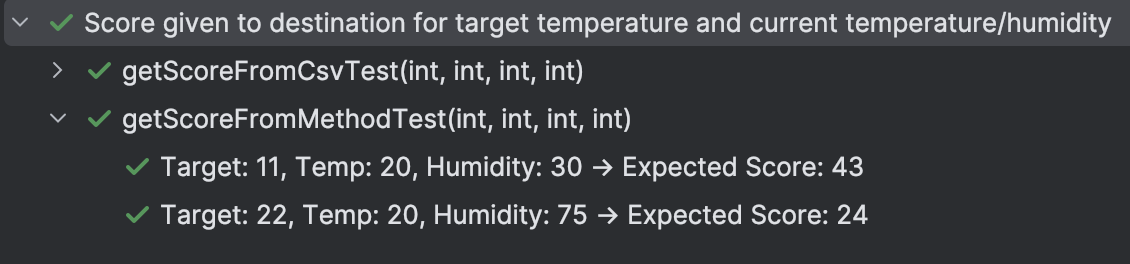
    @ParameterizedTest(name = "Target: {0}, Temp: {1}, Humidity: {2} → Expected Score: {3}")
    @MethodSource("scoreTestData")
    public void getScoreFromMethodTest(int targetTemperature, int temperature, int humidity, int expectedScore) {
        Assertions.assertEquals(expectedScore, ScoreHelper.getScore(targetTemperature, temperature, humidity));
    }

    private static Stream<Arguments> scoreTestData() {
        return Stream.of(
                Arguments.of(11, 26, 30, 45),
                Arguments.of(22, 21, 75, 22),
                Arguments.of(22, 33, 75, 72),
                Arguments.of(22, 37, 75, 80),
                Arguments.of(22, 14, 75, 26),
                Arguments.of(22, 15, 75, 34),
                Arguments.of(22, 22, 75, 30),
                Arguments.of(22, 28, 75, 52),
                Arguments.of(22, 38, 75, 92)
        );
    }
}
Other ways to supply arguments include:
- @EmptySource, @NullSource,
- @EnumSource,
- @CsvFileSource: load input test data from an external CSV file,
- @ValueSource(strings = {“2 weeks”, “1 month”}): provides simple inputs directly, etc.
Parameterized tests help avoid repetitive test code but should be used with caution to ensure tests stay readable.
@ParameterizedTest & @Displayname annotations are also available to make tests more understandable.
Interaction-based tests
In unit testing, we often encounter dependencies that are difficult or impractical to include in tests — such as databases, external services or complex components. These can not only introduce unreliability, slowness, or unwanted side effects in tests but also breaks to purpose of a unit test which is to test a piece of code in isolation. For example, if a test relies on an API response to perform a calculation, when the API is unavailable, the test will fail. We’d have tested connectivity to this API rather than the business calculation logic in this case.
As a result, we use test doubles for these dependencies — such as stubs or mocks — instead of relying on real instances.
These test doubles simulate the behavior of the actual dependency and help ensure that tests are fast, deterministic and focused.
These mock objects are configured to return a custom response when an interaction with this object’s instance
is detected during the code execution.
Note the use of @BeforeEach rather than a @BeforeAll for the mock setup in the below test. While the mock client
mockHttpClient may seem like
it could be reused, each test might require different expectations: one test may check a 200
response, another test might check a 500 response.
To set a clean state, this setup is best done before each test.
import holidaysfinder.WeatherClient;
import org.junit.jupiter.api.BeforeEach;
import org.junit.jupiter.api.Test;
import org.junit.jupiter.params.ParameterizedTest;
import org.junit.jupiter.params.provider.Arguments;
import org.junit.jupiter.params.provider.MethodSource;
import org.mockito.Mockito;

import java.io.IOException;
import java.net.http.HttpClient;
import java.net.http.HttpRequest;
import java.net.http.HttpResponse;
import java.util.stream.Stream;

import static org.junit.jupiter.api.Assertions.*;
import static org.mockito.ArgumentMatchers.any;
import static org.mockito.Mockito.when;

public class WeatherClientTest {
    private HttpClient mockHttpClient;
    private HttpResponse<String> mockHttpResponse;
    private WeatherClient weatherClient;

    @BeforeEach
    void setup() throws IOException, InterruptedException {
        // Need to mock the httpClient to test the restToInt method
        // we don't want to perform the actual call, so mocking the client
        mockHttpResponse = Mockito.mock(HttpResponse.class);
        mockHttpClient = Mockito.mock(HttpClient.class);

        when(mockHttpClient.send(any(HttpRequest.class), any(HttpResponse.BodyHandler.class)))
                .thenReturn(mockHttpResponse);
        weatherClient = new WeatherClient(mockHttpClient);
    }

    @ParameterizedTest
    @MethodSource("temperatureTestData")
    public void testGetTemperatures(String response, int expectedTemperature) throws Exception {
        when(mockHttpResponse.statusCode()).thenReturn(200);
        when(mockHttpResponse.body()).thenReturn(response);
        assertEquals(expectedTemperature, weatherClient.getTemperature("myTestCity"));
    }

    @ParameterizedTest
    @MethodSource("humidityTestData")
    public void testGetHumidities(String response, int exceptedHumidity) throws Exception {
        when(mockHttpResponse.statusCode()).thenReturn(200);
        when(mockHttpResponse.body()).thenReturn(response);
        assertEquals(exceptedHumidity, weatherClient.getHumidity("myTestCity"));
    }

    @Test
    public void testFailDataWeatherFetch() {
        when(mockHttpResponse.statusCode()).thenReturn(500);
        assertAll(
                () -> assertThrows(Exception.class, () -> weatherClient.getHumidity("test_city")),
                () -> assertThrows(Exception.class, () -> weatherClient.getTemperature("test_city"))
        );
    }

    private static Stream<Arguments> temperatureTestData() {
        return Stream.of(
                Arguments.of("-6°C", -6),
                Arguments.of("+36°C", 36),
                Arguments.of("-0°C", 0),
                Arguments.of("---", 0)
        );
    }

    private static Stream<Arguments> humidityTestData() {
        return Stream.of(
                Arguments.of("55%", 55),
                Arguments.of("3%", 3),
                Arguments.of("100%", 100),
                Arguments.of("0%", 0),
                Arguments.of("+++", 0)
        );
    }
}
Note that a small change had to be made to the original WeatherClientso that HttpClient could be injected for mocking
purposes.
// Changes to WeatherClient.java
+    public WeatherClient(HttpClient client) {
+        this.client = client;
+    }

// Changes to Destination Finder
-   private static final WeatherClient weatherClient = new WeatherClient();
+   private static final WeatherClient weatherClient = new WeatherClient(HttpClient.newHttpClient());
“Quis custodiet ipsos custodes?” [“Who will guard the guards?”]
Mutation testing is one of the techniques used to evaluate the quality of existing tests. Code mutants are created
by modifying small parts of the program: an equals turned into not equals or && turned into || for
instance. More mutations can be done: statement deletion or duplication, modification of arithmetic expressions, etc.
More reading can be done on this topic using the references.
The idea behind using mutants is that they represent bug introduction which the tests should be able to catch. Failure to identify and locate the fault introduced by mutants can be an indicator of the tests quality.
For mutation testing to function at scale, a large number of mutants are usually introduced, leading to the compilation and execution of an extremely large number of copies of the program. This problem of the expense of mutation testing had reduced its practical use as a method of software testing.
PIT in Action
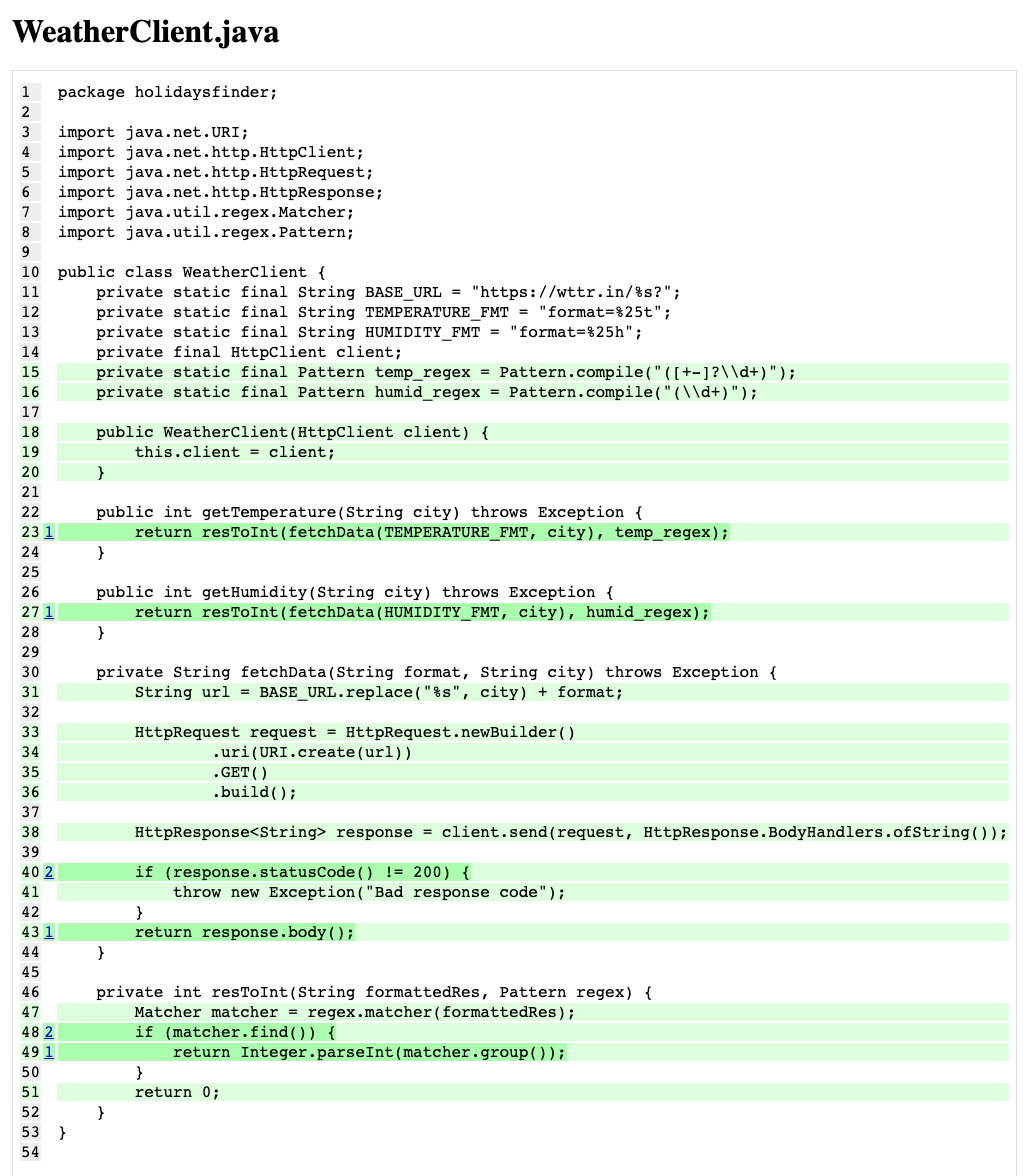
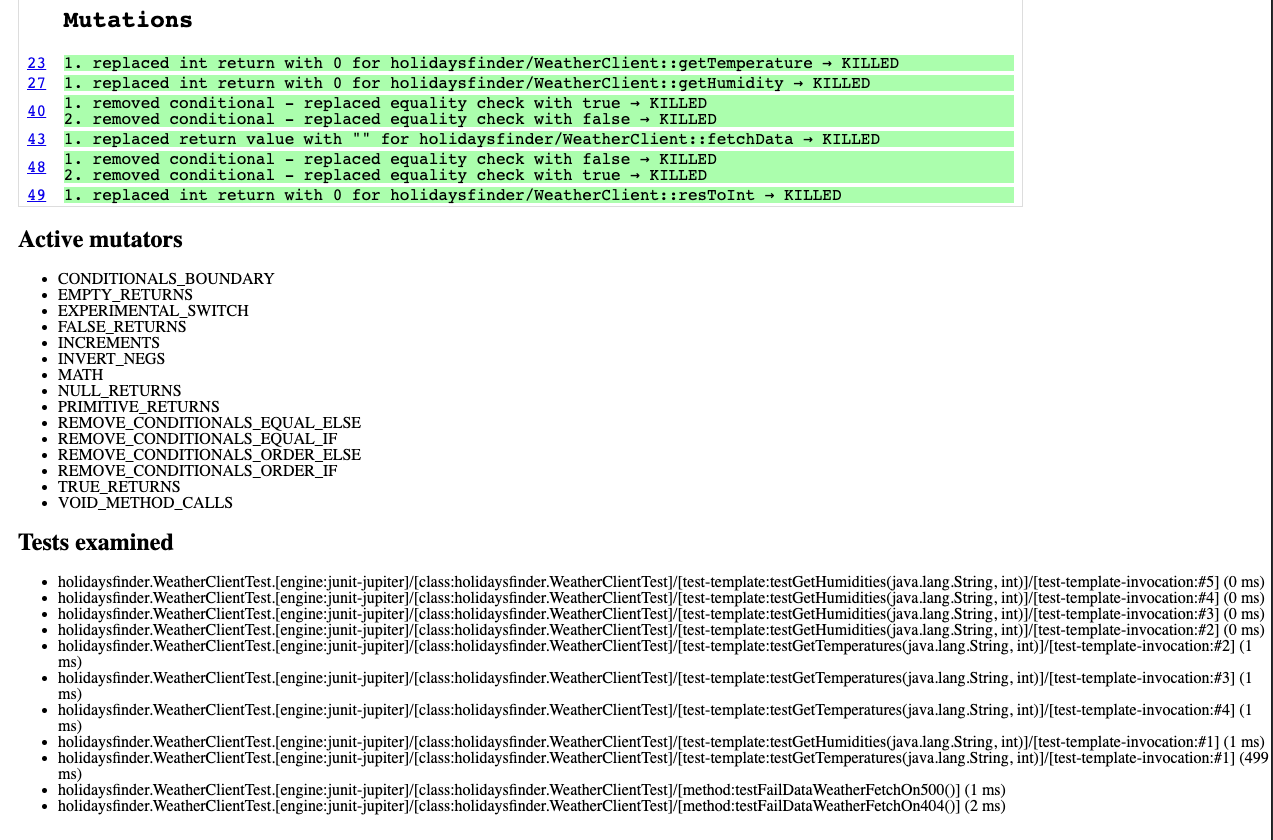
We’re using PIT to evaluate our tests. The outputs show 9 tests were examined and all the 35 mutations covered by the tests were killed for a test strength reported of 100%.
<!-- PIT Mutation Testing Plugin -->
<plugin>
    <groupId>org.pitest</groupId>
    <artifactId>pitest-maven</artifactId>
    <version>1.19.5</version>
    <configuration>
        <configuration>
            <testPlugin>junit5</testPlugin> <!-- This is crucial -->
        </configuration>
        <targetClasses>
            <param>holidaysfinder.*</param> <!-- <- Adjust this -->
        </targetClasses>
        <targetTests>
            <param>holidaysfinder.*</param>
        </targetTests>
        <mutators>
            <mutator>STRONGER</mutator>
        </mutators>
        <outputFormats>
            <param>HTML</param>
        </outputFormats>
    </configuration>
    <dependencies>
        <dependency>
            <groupId>org.pitest</groupId>
            <artifactId>pitest-junit5-plugin</artifactId>
            <version>1.2.3</version>
        </dependency>
    </dependencies>
</plugin>
The mutated lines are highlighted while the state of each mutant is given: survived or killed.